
StitchImage: Zero-Install Image Stitching
Open and use instantly. No sign-up required. Your images never leave your browser.
Have You Ever Run Into These Situations?
- You took two long screenshots and want to stitch them vertically into complete chat history
- You made a Before / After comparison and need to display them side by side
- You want to add some gap between images or change the background color, but don’t want to fire up a bloated Photoshop
- You asked AI to stitch two images together, to find the text in the output turned blurry
If any of these sound familiar, StitchImage is for you.
What Is StitchImage?
StitchImage is an image stitching tool that runs entirely in your browser. It merges two images horizontally or vertically into a single complete picture — all processing happens locally on your device. Your images are never uploaded to any server.
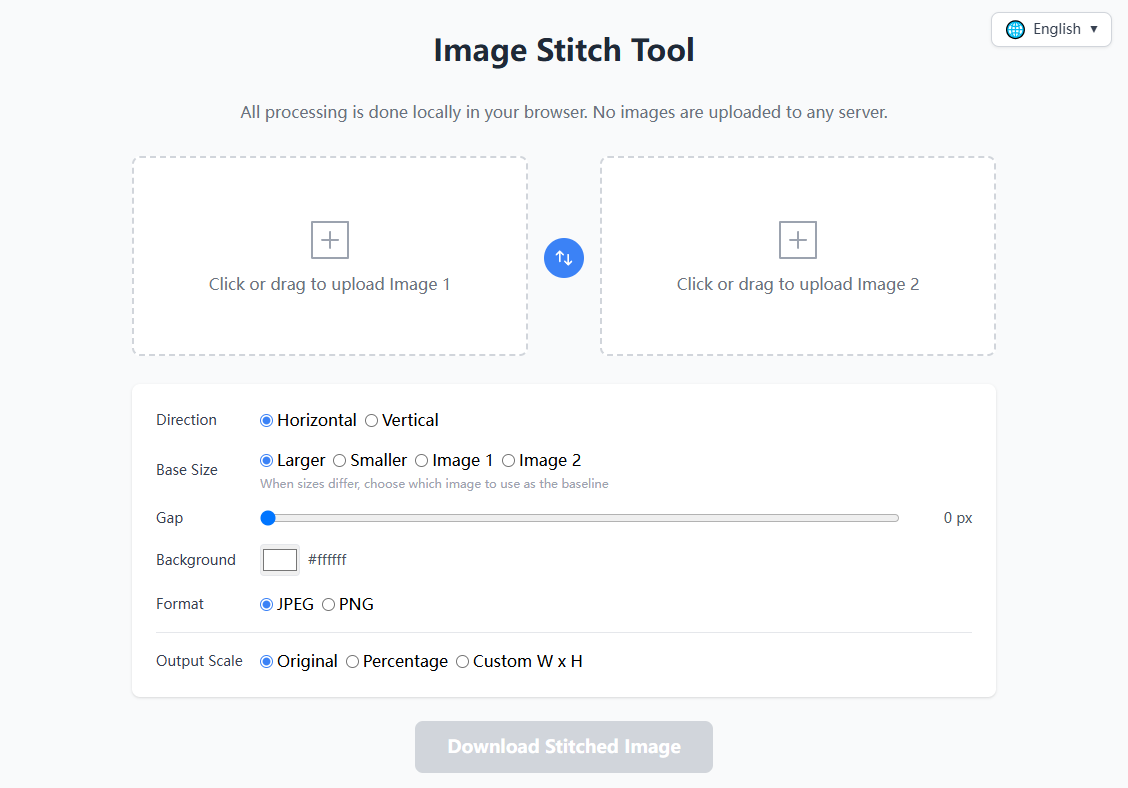
The interface is super simple and intuitive at a glance:
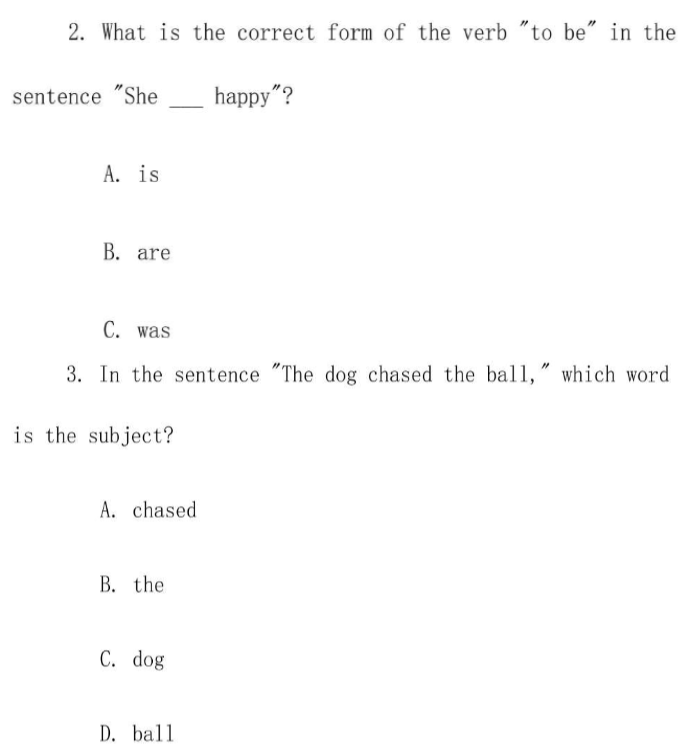
Here’s what the output looks like:
Easy to get started:
- No installation
- No Node.js / npm / webpack
- No back-end server
- No sign-up or login
- No “freemium” gimmicks
Open StitchImage Now → — no sign-up required, start stitching instantly.
Core Features at a Glance
| Feature | Description |
|---|---|
| Horizontal / Vertical Stitching | Place two images side by side or stack them top to bottom |
| Four Base Size Strategies | Use the larger image, smaller image, Image 1, or Image 2 as the reference size; the other image scales proportionally |
| Gap Control | Adjustable from 0–200 pixels — set the spacing between images to your liking |
| Background Color | Built-in color picker — fill the background and gap areas with any color |
| Output Scaling | Original size / percentage scaling (1–1000%) / custom width × height (up to 16384px) |
| Format Selection | JPEG (lossy, smaller file) or PNG (lossless, higher quality) |
| Real-Time Preview | The preview canvas updates instantly with every parameter change — what you see is what you get |
| One-Click Swap | Swap the positions of Image 1 and Image 2 with a single click |
| Drag & Drop Upload | Drag files the upload area, or click to browse and select |
How to Use
Step 1: Open StitchImage in your browser.
Step 2: Upload two images — click the upload area or drag and drop files directly.
Step 3: Choose the stitch direction, base size strategy, gap, background color, output format, and scaling mode.
Step 4: Click “Download Stitched Image” and the result is saved to your device.
That’s it — four steps and you’re done.
Technical Highlights
Fully Offline, Privacy Guaranteed
All image processing in StitchImage is done locally in the browser via HTML5 APIs. Images are read from your hard drive, processed on your screen, and written back to your hard drive. No data is transmitted over the network at any point.
This means:
- You can safely stitch screenshots containing personal information
- Confidential company document screenshots will never leak to a third-party server
- It works perfectly even when you’re offline
Six-Language Support
The project features a user interface in 6 languages:
- English
- 中文(简体)
- Français
- Русский
- 日本語
- 한국어
Switch instantly using the language selector in the top-right corner of the page.
Who Is It For?
- Designers: Quickly create side-by-side comparison images and effect showcases
- Developers: Stitch screenshots for documentation, bug reports, and pull request descriptions
- Content Creators: Build social media collages (Instagram carousel posts, Xiaohongshu long images)
- Everyday Users: Stitch chat histories, exam screenshots, receipt screenshots
- Privacy-Conscious Users: Anyone who doesn’t want to hand their images over to an tool
Known Limitations
- Only two images can be stitched at a time (three or more are not supported)
- Maximum output size is 16384 × 16384 pixels (browser Canvas limitation)
- No image editing features (cropping, rotation, filters, etc.)
- No batch processing
These limitations are intentional — StitchImage is designed to be a focused, lightweight, minimalist single-purpose tool, not an all-in-one image editor.
StitchImage — An image stitching tool stripped down to its essence. Open, stitch, download. That’s all there is to it.