
ZWPlayer RTSP Web Playback Solution
1. Overview
zwplayer is a video player designed specifically for HTML5 webpages, capable of achieving seamless playback of RTSP protocol video streams in modern browsers. This solution primarily addresses the real-time playback requirements of network camera RTSP video streams in modern H5 browsers.
2. Technical Background
Modern browsers (such as Chrome, Edge, Firefox, etc.) have the following limitations:
- Do not support ActiveX controls
- Cannot perform Socket programming for TCP protocols via JS
Therefore, current modern browsers cannot natively play RTSP protocol streams.
3. Solution Architecture
This solution works by handing over the RTSP stream requested by the H5 player to a media gateway server (a co-processing streaming server). The media gateway server pulls the camera’s RTSP stream for protocol conversion (including transcoding when necessary), converting the RTSP stream into WEBRTC, HTTP-FLV, HLS, or DASH streams supported by modern browsers. It utilizes ZWPlayer to call MSE interfaces to achieve plugin-free playback of RTSP video streams in H5 webpages.
3.1 Flowchart
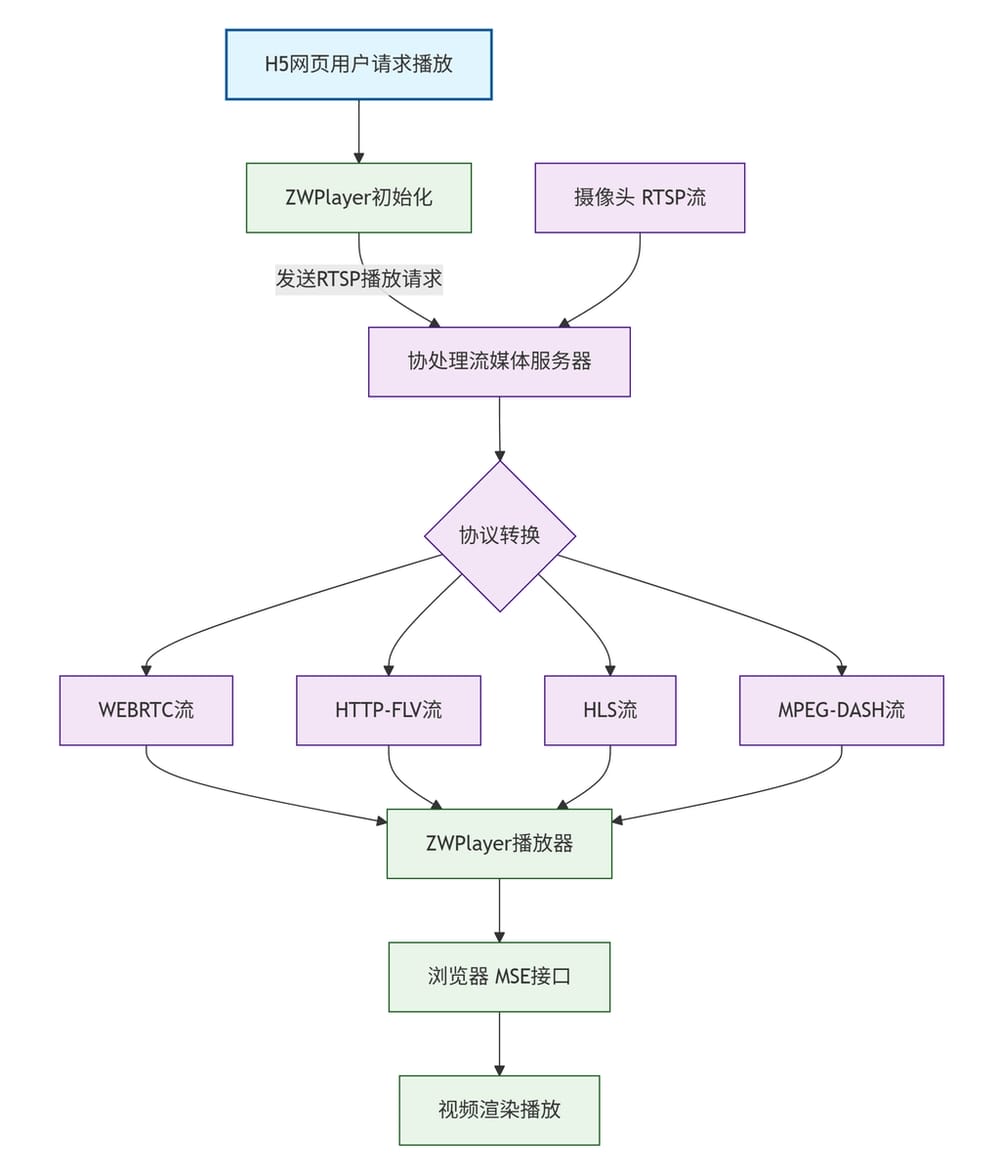
3.2 Process Description
Start: User Request Initiated
H5 Webpage User Request for Playback → zwplayer Initialization Configuration
- User triggers the playback request on the webpage
zwplayerinitializes based on configuration parameters- Directly passes the RTSP stream address to
zwplayer
Phase 1: Server-Side Processing
- Request Forwarding:
zwplayersends theRTSPstream address to the media gateway- Carried parameters:
xmc_url,rtsp_over_tcp,rtsp_bypass, etc.
- Carried parameters:
- Stream Acquisition: The media gateway pulls the original
RTSPstream - Protocol Conversion: The media gateway performs real-time protocol conversion:
- RTSP → WEBRTC/HTTP-FLV/HLS/DASH
- Determines whether transcoding is necessary based on the set
rtsp_bypassparameter
Phase 2: Client-Side Playback
- Stream Reception: The browser receives the converted streaming media data
- MSE Decoding:
zwplayercalls the browser’s MSE interface for decoding - Video Rendering:
zwplayerplays the video
3.3 Configuration Parameters
To play RTSP protocol streams directly in an H5 browser, the following parameters need to be passed when constructing the zwplayer instance:
| Parameter Name | Type | Default | Required | Description |
|---|---|---|---|---|
xmc_url |
String | - | Yes | Media gateway address. The media gateway pulls the camera’s rtsp stream and converts it into a protocol acceptable to the html5 player (such as http-flv, webrtc, etc.). Examples: ws://xmc.zwplayer.cn:8138 or http://xmc.zwplayer.cn:8138 . zwplayer interacts with the media gateway using the WebSocket protocol. |
rtsp_over_tcp |
Boolean | true | No | RTSP transport protocol selection (true=TCP, false=UDP). RTSP using UDP transport cannot cross network segments. Therefore, if cross-segment access is required (e.g., forwarding camera video from the public network), using TCP-based RTSP protocol is recommended. |
rtsp_bypass |
Boolean | false | No | Whether to re-encode audio and video |
has_audio |
Boolean | false | No | Whether to keep the audio stream |
Network Transmission Recommendations
- Local Area Network Environment: Can try
rtsp_over_tcp: false (UDP transmission, lower latency) - Cross-segment/Public Network: Recommend
rtsp_over_tcp: true (TCP transmission, better stability)
Performance Optimization Options
rtsp_bypass: true: No re-encoding, lower latency (requires browser support for original encoding format)rtsp_bypass: false: Force transcoding, better compatibility
4. Complete Example
<!DOCTYPE html>
<html>
<head>
<script type="text/javascript" charset="utf-8" src="https://cdn.zwplayer.com/v3/zwplayer/zwplayer.js"></script>
</head>
<body>
    <div id="mse" style="width: 800px; height: 450px;"></div>

    <script type="text/javascript">
        // Player Configuration
        var streamInfo = {
            playerElm: '#mse',        // Player container element
            url: 'rtsp://admin:ab123456@192.168.1.64:554/main',  // RTSP stream address
            xmc_url: 'http://xmc.zwplayer.cn:8138',  // Media gateway address, modify according to actual situation
            rtsp_over_tcp: true,     // Use TCP transmission
            rtsp_bypass: true,       // Enable encoding bypass
            has_audio: false,        // Disable audio
        };
        var player1 = new ZWPlayer(streamInfo);
    </script>
</body>
</html>
5. Millisecond-Level Low Latency Demo
If webrtc output is used without transcoding, the total latency is less than 300 milliseconds, which is lower than the camera’s own preview latency:
Low Latency Test: