
Free Video Player Officially Launches
We are thrilled to announce that, following meticulous development and multiple rounds of testing, the ZWPlayer All-in-One Web Player is officially released today!
This is a no-download, ready-to-use tool designed specifically to address core user pain points in audio/video playback, recording, and management. Now, simply visit /tools/videoplayer/ to experience the full range of features for free.
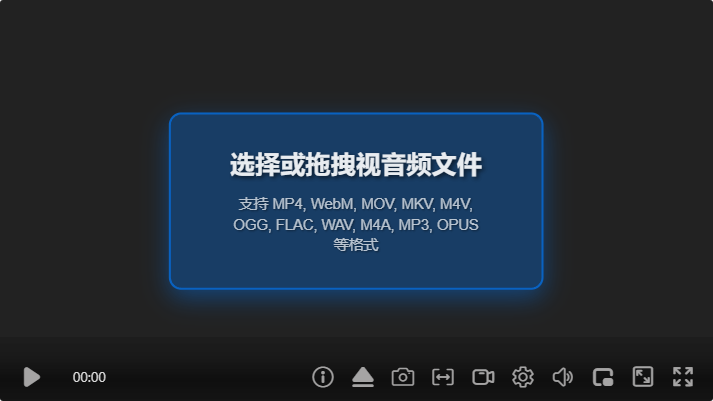
The interface is shown below:
1. 🎉 What Core Capabilities Do We Offer?
I. Full Protocol Coverage — A Truly Universal Player
We support direct playback of:
- Mainstream Live Protocols: WEBRTC (Ultra-low latency), RTSP (Plugin-free), HLS, DASH, WSS, FLV
- Local Audio & Video Files: MP4, WebM, MKV, MOV, MP3, FLAC, etc. (Supports drag-and-drop playback)
Whether for surveillance debugging, live viewing, VOD playback, or local file playback, ZWPlayer handles it all with stability.
II. Professional-grade Clip Looping (AB Loop)
We provide precise segment selection tools supporting loop playback of any interval. This feature is particularly useful for:
- Language Learning: Repeatedly listening to dialogue and pronunciation
- Instrument Practice: Looping breakdowns of movements and techniques
- Dance Training: Slow-motion review of key frames
III. Flexible Recording Capabilities
We support two recording modes:
- Live Stream Real-time Recording: Capture exciting moments from live streams
- VOD Clip Recording: On-demand cutting and downloading of specific segments
- Independent Audio Extraction: Supports “Audio Only” recording, perfect for capturing精彩 dialogue or language learning scenarios
IV. Dual External Subtitles and Chapter Navigation
We support mounting two subtitle files simultaneously (.srt/.bcc/.vtt/.json) and provide chapter marking functionality to make learning and research more efficient.
V. 4x Volume Gain and Global Hotkeys
We feature a built-in volume enhancement engine supporting up to 4x amplification. We also provide a comprehensive global hotkey system (right-click to view shortcuts) for professional-level operational efficiency.
2. 🔒 Our Privacy Commitment
All playback records, favorites, and recorded files are saved in your browser’s local cache. We never collect, upload, or store any user data. Your usage behavior remains completely private and secure. Please remember to back up important recorded files promptly.
3. 📌 Official Usage Recommendations
Recommended Browser: For complete feature support, we recommend using Chrome, Microsoft Edge, or other Chromium-based browsers.
Local File History Note: Due to browser security policy restrictions, playback history for local audio/video files cannot be retained after page refresh. Thank you for your understanding.
Quick Start Guide:
- Visit the official site /tools/videoplayer/
- Network Stream Playback: Paste the URL directly
- Local File Playback: Drag the file into the playback area
- Clip Recording: Select the interval and click “Record”
- View Shortcuts: Right-click on the playback screen
4. ❓ Official FAQ Highlights
Q1: How to record audio only? A: After clicking the “Record” button, select “Record Audio Only”, or set it as default in “Settings” → “Recording Settings”.
Q2: The volume is maxed out but still not loud enough? A: Go to “Settings” → “Audio Adjustment” panel and enable the volume enhancement feature, which supports up to 4x amplification.
Q3: How to view the complete list of hotkeys? A: Right-click within the player video area and select “Hotkey Guide”.
5. 🚀 Try It Now
Experience Link: /tools/videoplayer/
We adhere to the product philosophy of being free, registration-free, and ready-to-use out of the box, continuously optimizing the feature experience. Your every use and feedback drives our progress.
ZWPlayer - Making Video Playback Simpler