
VTT Chapter Markers Guide for Developers
1. Overview
The WebVTT (Web Video Text Tracks) format is not used for providing subtitles and captions for videos, it is also a powerful metadata container. Among its uses, very important application is defining video chapters.
By adding a chapter track to a video, you can:
- Improve User Experience: Users can see chapter markers on the video player’s timeline and quickly jump to parts that interest them.
- Implement Non-linear Navigation: Allow users to browse video content just like browsing a book’s table of contents.
- Build Dynamic UIs: You can listen for chapter changes via JavaScript to dynamically update relevant information on the page (such as sidebar table of contents, titles, etc.).
This guide will detail how to create and use WebVTT chapter files.
2. Core Concepts: What is a Chapter Track?
A chapter track is a special type of WebVTT track where the kind attribute is chapters. Its main differences from subtitle tracks are:
- Purpose: It is not used to display text on the screen, but to define time segments of the video.
- Content: The ID of each chapter cue acts as the chapter title, while the cue’s payload part is usually empty.
Native browser players parse this track and display clickable chapter markers on the timeline of their control bar.
3. Detailed Explanation of WebVTT Chapter Syntax
The structure of a standard WebVTT chapter file is very simple.
3.1 File Header
The file must start with WEBVTT.
WEBVTTIt can be followed by some optional metadata, but for chapters, it is usually kept simple.
3.2 Chapter Cues
Each chapter is defined by a Cue Block, containing three parts:
- Cue ID: This is the title of the chapter. It is a human-readable string that will be displayed in the player’s chapter menu.
- Timestamp: Defines the start and end times of the chapter. The format is
HH:MM:SS.mmm --> HH:MM:SS.mmm. - Cue Payload: For chapters, this part is usually empty. All information for the chapter is provided by the ID and timestamp.
Syntax Rules:
- There must be a blank line between the Cue ID and the timestamp.
- There must also be a blank line between the timestamp and the payload (even if the payload is empty).
- Chapter times should be continuous, meaning the end time of the previous chapter should ideally be the start time of the next chapter, to avoid gaps or overlaps.
4. Complete Example
Let’s assume we have a video about “Coffee Brewing Tutorial” and want to divide it into three chapters: Introduction, Brewing, and Tasting.
Filename: coffee-tutorial-chapters.vtt
WEBVTT

NOTE This is a chapter file for a coffee brewing tutorial

01. Introduction
00:00:00.000 --> 00:01:30.500

02. Brewing Steps
00:01:30.500 --> 00:04:20.000

03. Tasting & Summary
00:04:20.000 --> 00:05:15.000
Example Analysis:
WEBVTT: Standard file header.NOTE ...: This is a comment; browsers will ignore it, but it is useful for developers.01. Introduction: This is the ID of the first chapter, and also its title. Users will see “01. Introduction” in the player.00:00:00.000 --> 00:01:30.500: Defines that the first chapter lasts from the start of the video to 1 minute 30.5 seconds.- There is a blank line between the Cue ID and the timestamp, and a blank line after the timestamp (because the payload is empty).
- The second chapter starts at
00:01:30.500, perfectly connecting with the end time of the previous chapter.
Users can see chapter markers during video playback and quickly jump to the parts that interest them.
5. Integrating Chapters in an HTML5 Page
After creating the .vtt file, you need to associate it with the <video> element using the HTML <track> tag.
Key Attributes:
kind="chapters": This is the most important attribute, it tells the browser that this VTT file is used to define chapters.src="path/to/your-file.vtt": Points to your WebVTT file.srclang="zh": Specifies the language of the chapter titles (e.g., Chinese).label="中文章节": Provides a human-readable label for the track, displayed in the player’s settings menu.
HTML Example:
<!DOCTYPE html>
<html lang="zh-CN">
<head>
    <meta charset="UTF-8">
    <title>WebVTT 章节示例</title>
    <style>
        body { display: flex; justify-content: center; align-items: center; min-height: 100vh; background-color: #f0f0f0; }
        video { max-width: 80%; box-shadow: 0 4px 8px rgba(0,0,0,0.2); }
    </style>
</head>
<body>
    <video controls width="640" poster="coffee-poster.jpg">
        <source src="coffee-tutorial.mp4" type="video/mp4">
        <track kind="chapters" src="coffee-tutorial-chapters.vtt" srclang="zh" label="中文章节">
        您的浏览器不支持 HTML5 视频。
    </video>
</body>
</html>
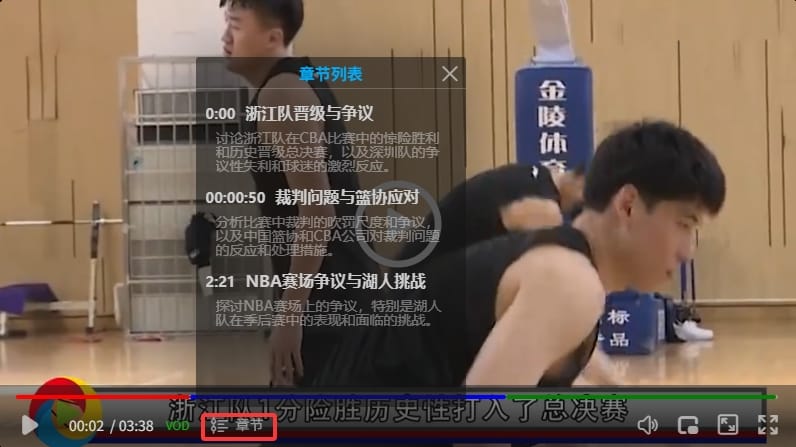
zwplayer offers simpler and friendlier chapter support compared to the native video tag. The method is called as follows:
// 初始化播放器
window.mainplayer = new ZWPlayer({
    url: 'http://example.com/vod/movie.mp4',
    playerElm: '#mse',
    chapterButton: true, // 启用章节按钮
});

// 延迟加载章节信息
setTimeout(function () {
    if (window.mainplayer) {
        window.mainplayer.setChapters('http://example.com/chapters.vtt');
    }
}, 200);
Interface screenshot is as follows:
6. Best Practices and Precautions
- Server MIME Type: Ensure your web server correctly configures the MIME type for
.vttfiles astext/vtt. Otherwise, browsers may fail to parse the file correctly. In Nginx, you can add themime.typesconfiguration:text/vtt vtt;. In Apache, you can add to the.htaccessfile:AddType text/vtt .vtt. - File Encoding: Save
.vttfiles using UTF-8 encoding to ensure non-English characters (like Chinese) display correctly. - Time Continuity: Ensure there are no large gaps or overlaps between chapters, as this ruins the user experience. Seamless connection is best practice.
7. Advanced Feature Extensions
7.1 Dynamic Chapter Generation
function generateChapters(videoDuration) {
    const chapters = [];
    const segmentDuration = videoDuration / 5;

    for (let i = 0; i < 5; i++) {
        const startTime = i * segmentDuration;
        const endTime = (i + 1) * segmentDuration;
        chapters.push({
            title: `第${i+1}部分`,
            start: startTime,
            end: endTime
        });
    }
    return chapters;
}
7.2 Data Analytics Integration
player.on('chapterchange', (chapter) => {
    analytics.track('chapter_view', {
        chapter_title: chapter.title,
        video_id: 'tutorial_001',
        timestamp: Date.now()
    });
});
8. Summary
WebVTT chapter marks are of the key technologies for enhancing video experience. Through this guide, you can:
- Master WebVTT chapter syntax specifications
- Implement HTML5 native chapter functionality
- Optimize chapter experience using ZWPlayer
- Advanced usage of chapters