
M3U8 Player: HLS Support in zwplayer
Open any mainstream live-streaming or video-on-demand platform and it most likely runs on M3U8. But the moment you actually need to “play an M3U8” in a web page, the real questions begin: which player do you choose? Can it handle live latency? How does it deal with subtitles? Are bitrate switches smooth?
This article covers the “M3U8 player” topic from the ground up—first explaining the M3U8 format and its evolution, then introducing how zwplayer, an M3U8 player, supports HLS in light of recent advances like LL-HLS and CMAF. The focus is on subtitle pre-download, search and translation, live chase, and adaptive bitrate. By the end you’ll have a complete picture of M3U8 playback and a clear sense of what makes a player genuinely professional.
Chapter 1: What Is M3U8? — Format and Background
1.1 The Relationship Between M3U8 and HLS
M3U8 is the playlist format used by the HLS (HTTP Live Streaming) protocol—the “8” stands for UTF-8. In short:
- The
.m3u8file itself contains no video. It is a plain-text manifest whose lines of tags describe the location, duration, bitrate, and encryption of media segments. - The actual audio/video data is split into many small files (traditionally
.tssegments, increasingly.m4sfMP4 segments today), and M3U8 orchestrates them.
A minimal M3U8 looks roughly like this:
#EXTM3U
#EXT-X-VERSION:3
#EXT-X-TARGETDURATION:6
#EXTINF:6.0,
segment-001.ts
#EXTINF:6.0,
segment-002.ts
#EXTINF:4.2,
segment-003.ts
#EXT-X-ENDLIST
#EXTM3U is the header, #EXTINF describes each segment’s duration and filename, and #EXT-X-ENDLIST marks a video-on-demand (VOD) playlist—a live playlist has no such tag, so the player keeps re-requesting the playlist to pick up new segments.
1.2 Core Characteristics of the M3U8 Format
Once you grasp the manifest concept, the key traits follow naturally:
- HTTP-based delivery: media segments are ordinary HTTP resources, so they pass through firewalls and NATs and ride on CDNs. This is HLS’s main advantage over legacy protocols like RTSP and RTMP—low deployment cost and good scalability.
- Segment plus index: splitting a long video into a few-second independent files suits CDN edge caching, resumable downloads, and recovery from network jitter.
- Master plus media playlist: the master playlist lists multiple sub-streams at different bitrates (the basis of adaptive bitrate, ABR); the media playlist is what actually describes the segments.
- Multi-track: through dedicated media tags, an M3U8 can carry multiple audio tracks, subtitle tracks, and alternate video streams, supporting multi-language and bilingual-subtitle scenarios.
- Encryption-ready: it supports AES-128 and SAMPLE-AES, and newer versions integrate DRM systems such as FairPlay, Widevine, and PlayReady.
For these reasons, M3U8 has become a mainstream web streaming format, and whether a player can “play M3U8 well” is a hard benchmark for its quality.
Chapter 2: The Evolution of M3U8 — From TS to Low-Latency CMAF
Behind M3U8 lies more than a decade of evolution aimed at higher resolution, lower latency, greater efficiency, and broader compatibility. That history determines what today’s M3U8 player must be compatible with and capable of. For the full story, see M3U8 Evolution: From HLS and TS to Low-Latency CMAF. Here are the four key stages:
| Stage | Core Technology | Demands on the Player |
|---|---|---|
| Founding (2009) | HTTP + .ts segments + H.264/AAC |
Parse basic playlists, play TS |
| Standardization (2010–2016) | RFC 8216, multi-audio/subtitle, AES-128 | Multi-track, encryption, cross-platform |
| HD era (2017) | HEVC + fMP4 (.m4s) |
Decode H.265, play fMP4 container |
| Low-latency (2019–present) | LL-HLS + CMAF | Support #EXT-X-PART, HTTP/2, CMAF |
2.1 The Founding Era: HTTP Meets TS
In 2009, Apple released HLS alongside iPhone 3.0, solving mobile streaming deployment with HTTP plus .ts segments. This established the core “segment plus index” architecture and the foundational capabilities of any M3U8 player: parse the playlist, fetch segments in order, and assemble them along the timeline for playback.
2.2 Standardization and Feature Expansion
In 2017, HLS became the IETF international standard RFC 8216. Multi-audio and subtitle tags were introduced, I-Frame playlists enabled precise seeking and previewing, and the AES-128 encryption scheme was formalized. For players, this meant moving beyond simple playlist parsing to handling multi-track selection, subtitle rendering, and decryption—a noticeable jump in capability.
2.3 The HD Era and Container Innovation: HEVC and fMP4
At WWDC 2017, Apple announced HLS support for HEVC (H.265) and fMP4 (Fragmented MP4):
- HEVC saves roughly 50% bandwidth over H.264 at equivalent quality, serving the 4K/8K era.
- fMP4 (segmented as
.m4s) shares its container format with MPEG-DASH, making “encode once, output both HLS and DASH” possible and paving the way for CMAF.
So a modern M3U8 player must support both .ts and .m4s segment containers and have HEVC decoding capability, or it will simply fail on new-format M3U8 streams.
2.4 Low Latency and Format Unification: LL-HLS and CMAF
Two main threads since 2019:
- LL-HLS (Low-Latency HLS): subdividing segments into smaller “partial segments” and combining them with HTTP/2 blocking requests compresses end-to-end latency from the traditional 30+ seconds down to 2–8 seconds. For the first time, HLS could serve latency-sensitive real-time scenarios like sports, live auctions, and video calls.
- CMAF (Common Media Application Format): unifies the media-fragment format of HLS and DASH, letting the same batch of
.m4sfiles be reused by both manifest types—true “encode once, play everywhere.”
The challenge for players is supporting the low-latency tags, leveraging HTTP/2 multiplexing, and correctly handling CMAF segment timing. zwplayer maintains good compatibility with these new formats, as detailed below.
Chapter 3: Why an M3U8 Player Deserves Its Own Discussion
After that evolution, back to a practical reality: browsers do not natively support playing M3U8. Other than Safari (which supports HLS natively via <video>), mainstream browsers like Chrome, Edge, and Firefox all need a JavaScript player library to “translate” M3U8. So an “M3U8 player” is essentially an engine running in a web page that decodes the M3U8 manifest into a browser-playable media stream.
With LL-HLS, CMAF, HEVC, and fMP4 spreading, a competent M3U8 player must simultaneously:
- Support a wide range of formats:
.ts/.m4s/ CMAF, H.264 / HEVC, VOD / live / LL-HLS. - Deliver a good live experience: low latency, jitter resistance, auto-reconnect, and the ability to chase the live edge.
- Do adaptive bitrate well: auto-switch quality based on network, and allow manual lock-in.
- Be strong on subtitles: render HLS-embedded subtitles, ideally also external subtitles, bilingual, search, and translation.
- Integrate easily across frameworks: drop-in usage without locking you into a particular frontend stack.
zwplayer is an M3U8 player built to this standard. It is a framework-agnostic pure-JavaScript browser player library—include it and go, embeddable in any frontend framework or vanilla page. Its approach: the lower layer relies on mature streaming engines that track LL-HLS, CMAF, HEVC, and fMP4, while the things that really shape experience—subtitles, live latency, and bitrate switching—are built as a self-developed enhancement layer.
Let’s go through each.
Chapter 4: zwplayer’s M3U8 Support
4.1 Subtitles: Pre-download, Search, Translation
Subtitles are where many M3U8 players fall short. HLS-embedded subtitles exist as WebVTT, and the conventional approach is to load on demand while playing—the result is subtitles that can’t be searched, can’t be located across segments, and can’t be translated. zwplayer takes a different path: it obtains the complete subtitle data first, then builds the experience on top.
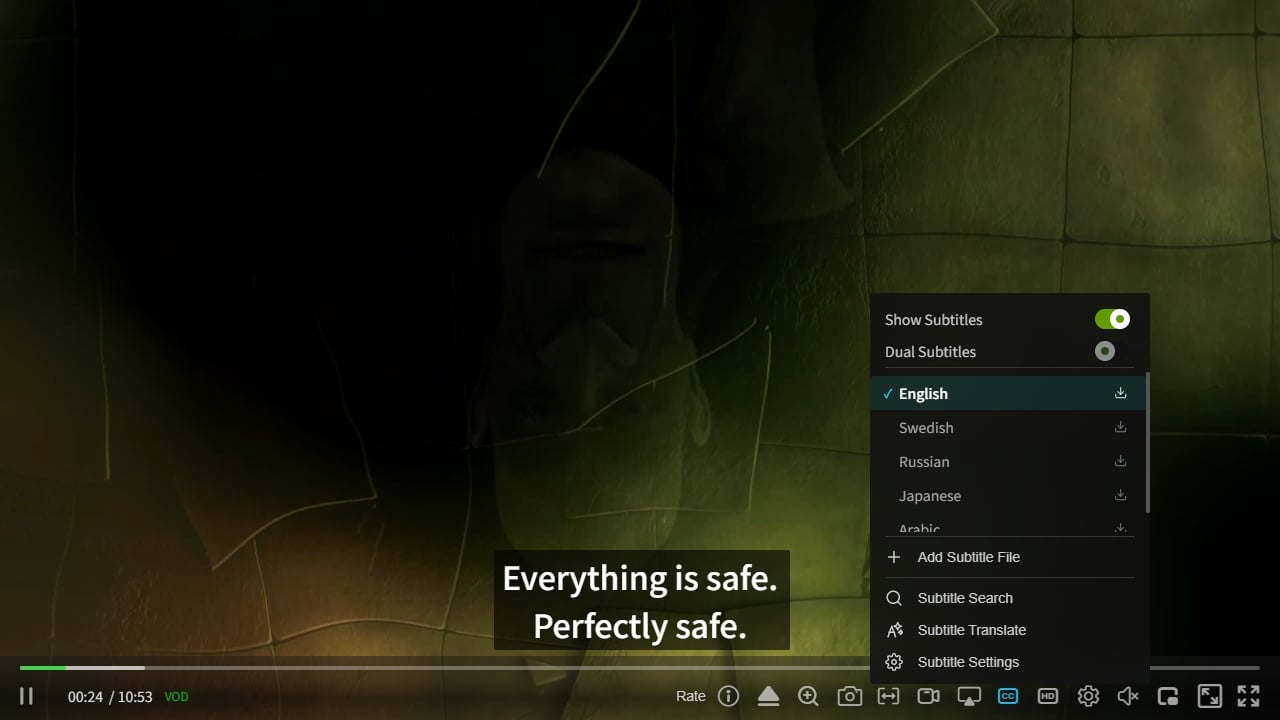
Subtitle Pre-download: Turning Streaming Subtitles into a Complete Library
The conventional player hands subtitles to the engine and loads them segment by segment as playback progresses. zwplayer does the opposite: as soon as it detects that an HLS stream carries subtitle tracks, it proactively downloads and parses the entire subtitle track in advance.
The direct benefit is that a user opens a subtitled video, the full subtitle track is soon available in its entirety—free to locate and search at any time, unconstrained by playback progress. And precisely because of this, the player can translate the subtitles right at the start—which is the foundation for the search and translation covered next.
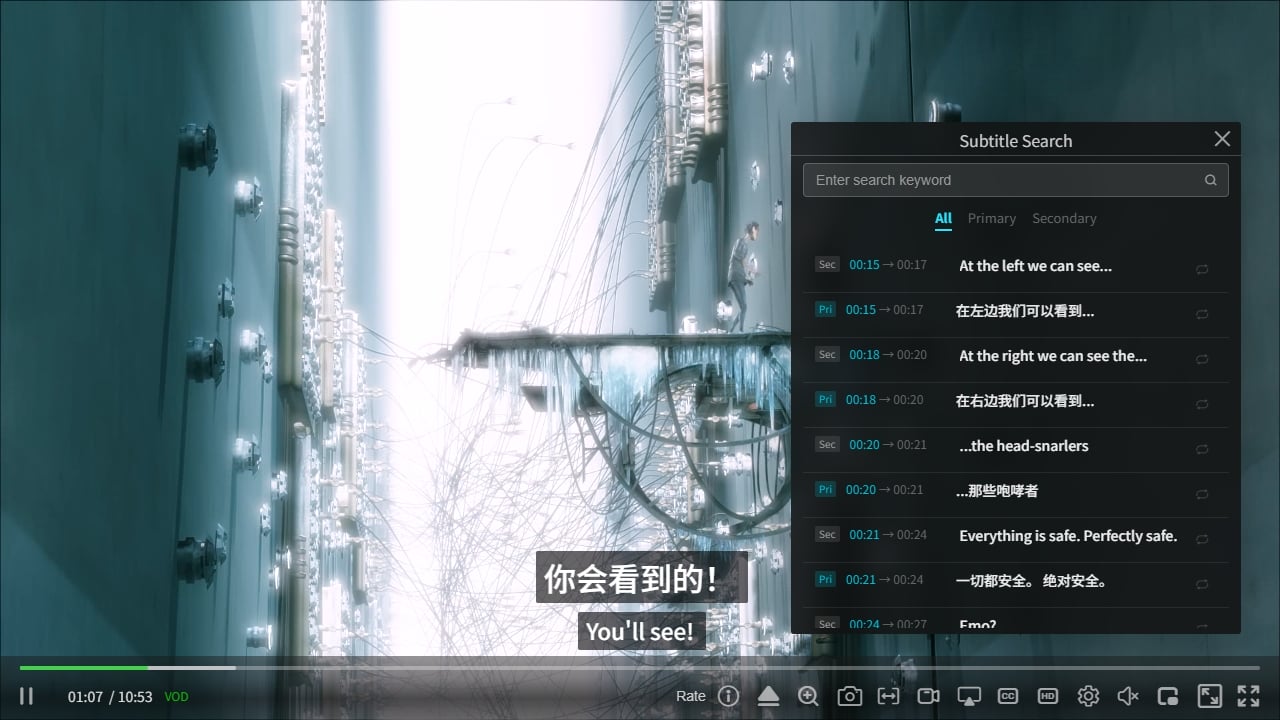
Subtitle Search: Search Subtitles Like a Document
With the complete subtitle library in hand, zwplayer offers full-text subtitle search:
- Enter a keyword to search the primary and secondary subtitle tracks; results are sorted by time, and clicking seeks directly to that timestamp.
- Search automatically handles styling tags in the subtitles, so results match what you see on screen.
- You can switch between the results list and the full list, handy for repeatedly locating a particular line.
For language learning, lecture review, or meeting-minutes lookup, this turns the player from “watch-only” into “searchable.”
Subtitle Translation: Translate the Whole Track Up Front
The real point of subtitle translation isn’t the bilingual subtitles you see at the end—it’s that translation can happen up front. Because subtitles are pre-downloaded, the player can hand the entire subtitle track to an AI translation engine right at the start of the video, translate it into the language the user wants, and add it as a new local subtitle track.
The biggest value of this is that users can search the entire HLS video in their own language, locating the segments they care about more quickly. This is especially useful for a few scenarios:
- Foreign trade: reviewing foreign-language product intros, client demos, and industry materials, and jumping straight to the relevant section with a keyword in your own language.
- Language learning: translating a foreign-language video’s subtitles into your native language for side-by-side study, or the other way around as dictation material.
- Teaching and knowledge sharing: pre-translating foreign-language tutorials and lectures to make lesson prep, note-taking, and resharing easier.
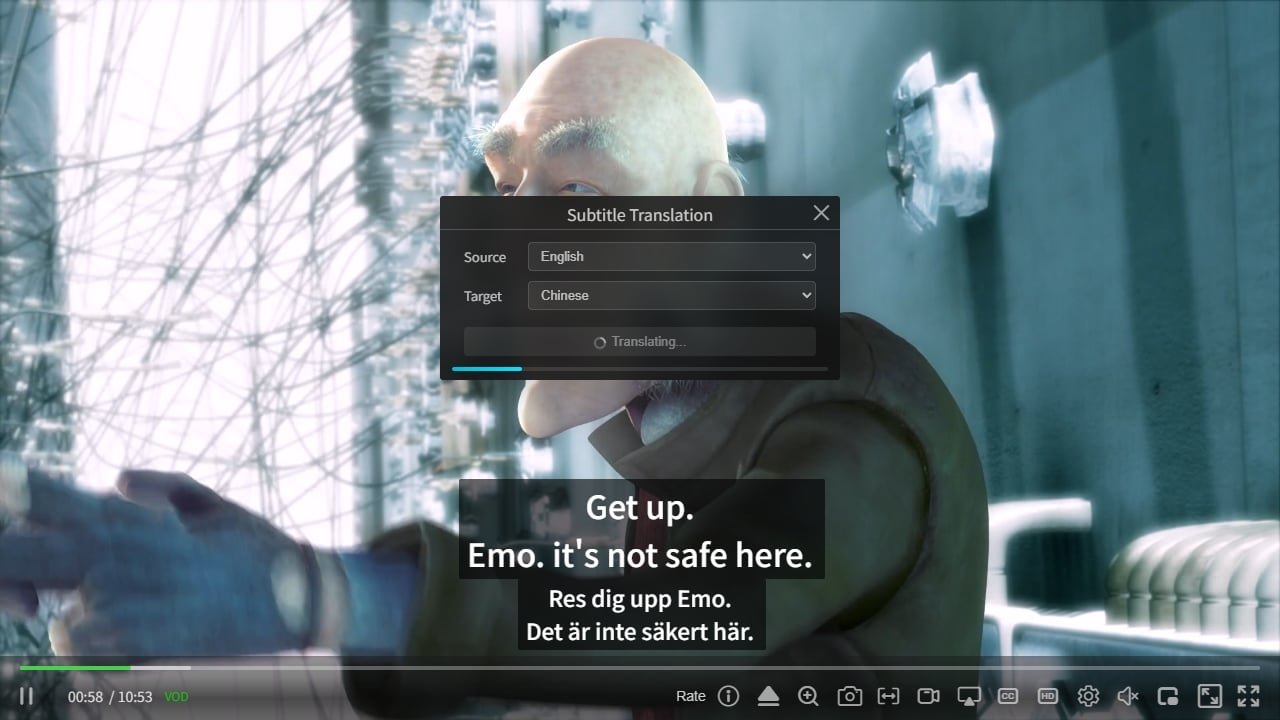
Once translated, users have two ways to view it:
- Translation only: show the translated subtitles as the primary subtitle on their own.
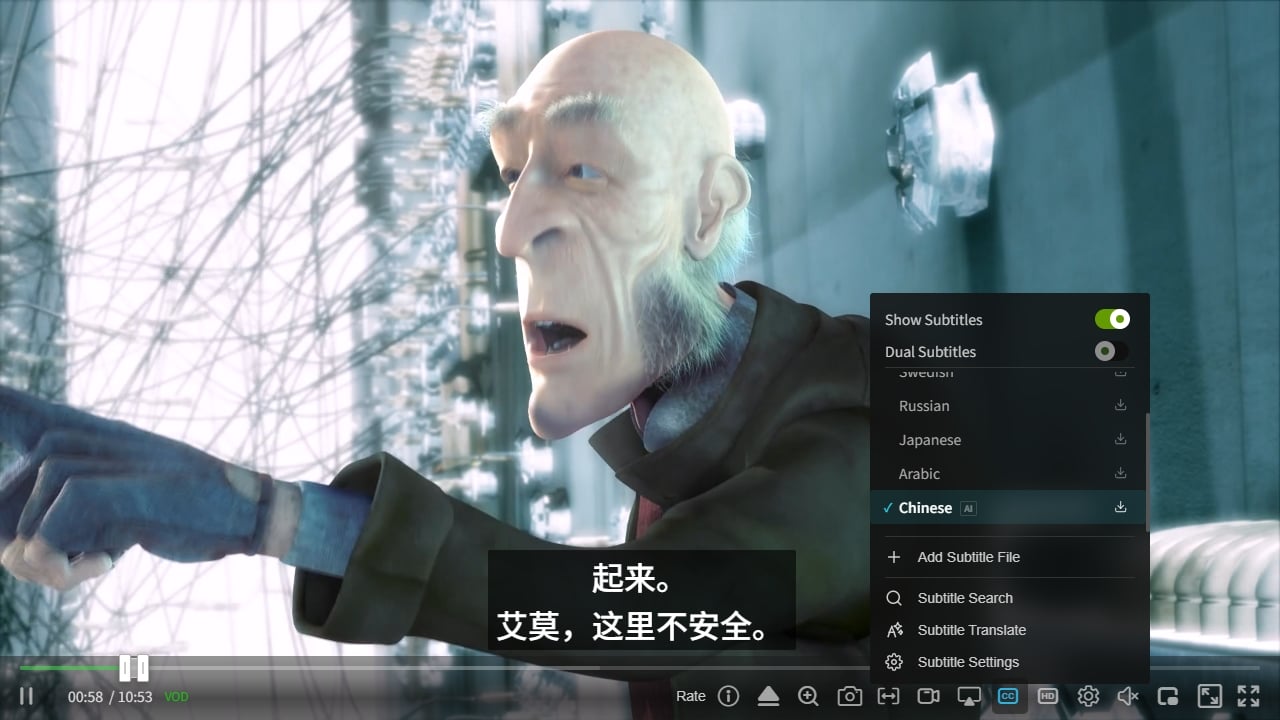
- Side-by-side: translation on top, original below, shown at the same time for line-by-line comparison. This is exactly how bilingual subtitles are meant to be used—the primary and secondary subtitles are displayed together for easy cross-checking.
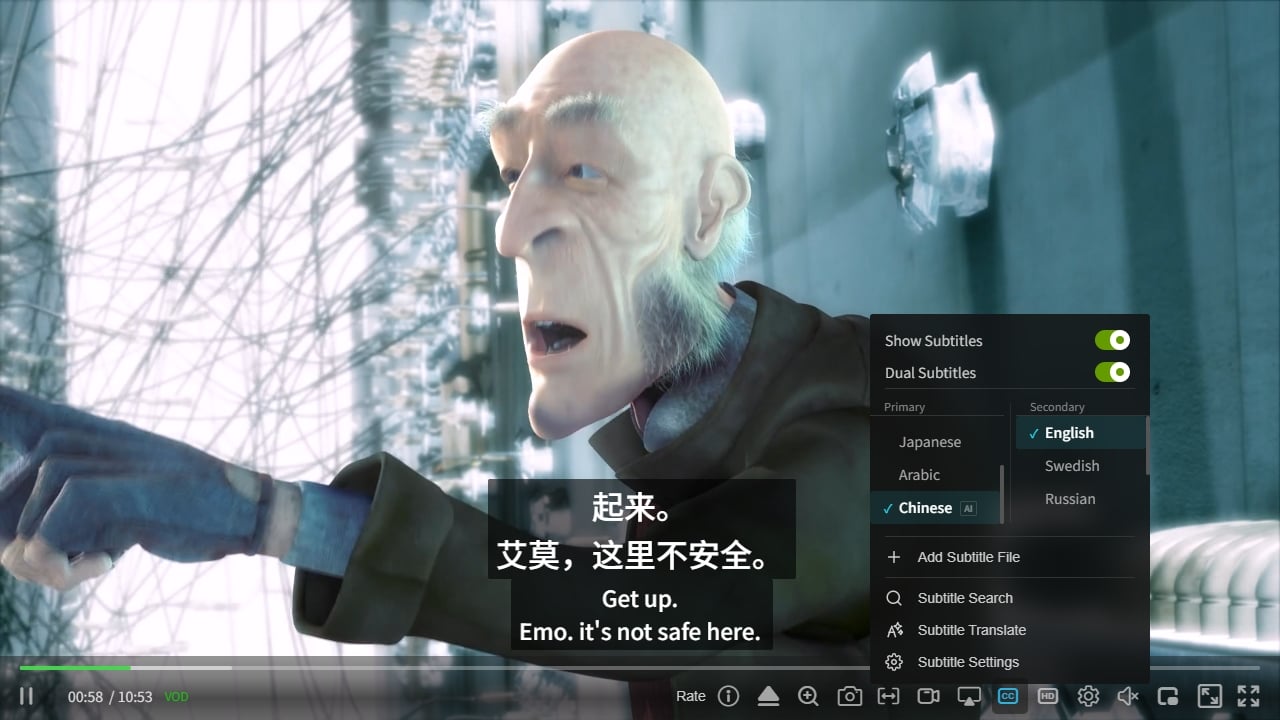
Also, the translation engine isn’t hard-coded. The player exposes a subtitle-translation interface specification, so users can plug in their own translation engine (a self-built service, a private deployment, or another third-party service) instead of being limited to the player’s default.
4.2 Live Chase: Chasing Latency to the Live Edge
In live streaming, latency is a major test for any M3U8 player. HLS is inherently segment-based, so a player that doesn’t actively chase will leave the user increasingly behind the real live edge.
zwplayer implements a chase mechanism for live streams: when it notices the playhead has fallen well behind the live edge, it temporarily raises the playback speed a little to “digest” the extra buffer, then returns to normal speed. Compared with a hard jump to the edge, this keeps the picture smooth. When latency is too large to catch up, there’s a fallback that jumps directly to near the edge. If a live stream drops unexpectedly (say, the publisher restarts), it auto-reconnects, and network errors are auto-recovered too, keeping the live session alive as much as possible.
It’s worth noting that extreme low latency under HLS depends mainly on LL-HLS itself. zwplayer’s chase enhancement focuses on low-latency live formats such as FLV and MPEG-TS, working alongside the engine’s own sync to push latency even lower. For live viewing, this means fewer moments of “falling behind” and an experience closer to real-time.
4.3 Adaptive Bitrate (ABR): Auto-Switching Quality, Manually Overridable
Adaptive Bitrate Streaming (ABR) is a core M3U8 capability. The goal is simple: HD when the network is good, auto-downscale when it’s bad, with no buffering.
zwplayer provides unified bitrate management:
- Auto-discover quality levels: the player automatically reads all bitrate levels listed in the M3U8 master playlist, builds a quality menu, and shows each level’s bandwidth cost (e.g., 2 M / 800 K) at a glance.
- Auto plus manual dual mode: the menu has an AUTO toggle at the top. With AUTO on, bitrate switching is handled by the underlying algorithm, which auto-adjusts quality based on real-time bandwidth; to save data or lock in a quality, pick a level manually.
- Seamless switching: bitrate changes happen at segment boundaries, with smooth transitions and no noticeable freeze or black flash.
- Transparent status: the menu shows both “your selected level” and “the currently playing level.” In AUTO mode you can see “I picked AUTO, and it currently chose 720p”—no silent switches you didn’t notice.
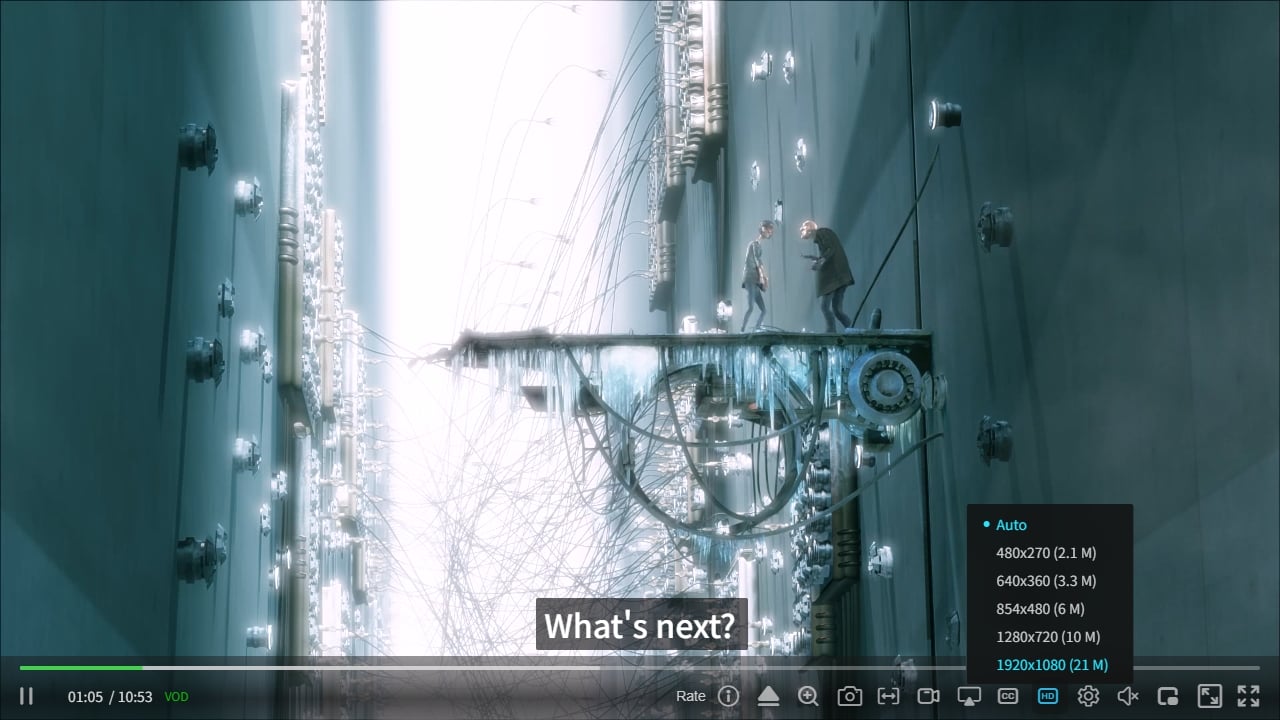
The approach is to leave bandwidth estimation and bitrate decisions to proven engines, while zwplayer itself handles the unified, clear bitrate-interaction experience. For the user, the result is smooth, controllable, understandable bitrate switching.
Chapter 5: What Else zwplayer Can Do
Beyond the three above, zwplayer offers a set of companion capabilities:
- Full protocol coverage: besides HLS/M3U8, it also supports MPEG-DASH, FLV, MPEG-TS, WebRTC, RTSP, and other mainstream protocols, auto-routed by address—one player for many sources.
- Full subtitle-format support: SRT, VTT, and HLS WebVTT can all be parsed and rendered; it supports drag-and-drop external subtitles, a subtitle menu, dual subtitles, and SRT export.
- A-B loop and chapter management: single-line or paragraph-level subtitle A-B looping for language learning and intensive listening; combined with the chapter list for quick navigation.
- Cross-platform and easy integration: framework-agnostic, drop-in, with unified desktop and mobile layout adaptation.
If you’re interested in the subtitle capabilities, see the subtitle search feature and the VTT chapters guide.
Conclusion: What Makes an M3U8 Player Professional
Back to the opening question—how do you choose an M3U8 player.
A genuinely professional M3U8 player does more than “play M3U8.” It keeps up at every evolutionary node of the protocol: handles containers from .ts to CMAF .m4s, embraces LL-HLS low-latency features, does live chase, adapts bitrate through network fluctuations, and—when subtitle demand is high—provides a complete subtitle workflow from pre-download to search and translation.
zwplayer is built to this standard. It maintains compatibility with LL-HLS, CMAF, HEVC, and fMP4 at the lower layer, and invests in the areas that shape experience—subtitles, live chase, and adaptive bitrate: subtitles can be downloaded, searched, and translated; live streams can be chased and kept connected; bitrate is accurate on auto and stable on manual. If you’re looking for a player that both plays M3U8 out of the box and holds up on experience details, visit the zwplayer live demo page and try it hands-on.
Related Reading
- What Is the M3U8 Format? Download / Playback / Convert to MP4
- M3U8Grab: Free M3U8/HLS Stream Downloader
- M3U8 Evolution: From HLS and TS to Low-Latency CMAF
- M3U8 File Format in HLS: Developer Guide
- CMAF Guide: The Unifying Key for HLS and DASH
- Subtitle Search Feature
This article is written and maintained by the ZWPlayer core engineering team, based on the real HLS protocol specification and zwplayer engineering practice. Last updated July 2026. For the player’s latest capabilities, please refer to the zwplayer website.