
Play RTSP Streams in the Browser Without Plugins
When a surveillance project reaches “view cameras on a web page”, it hits the RTSP wall: browsers don’t support RTSP, and historically you either installed NPAPI plugins (long dead) or ran endless server-side transcoding (FFmpeg pull-convert-push, CPU on fire). ZWPlayer’s route is lighter: paste the rtsp:// URL straight into the player and let a media gateway translate protocols in the middle — zero plugins, zero transcoding scripts on the web side. This article covers the whole chain, the config, and troubleshooting.
Why Browsers Can’t Play RTSP
RTSP is a LAN-oriented real-time streaming protocol on dedicated TCP/UDP ports; the browser sandbox has neither its protocol stack nor permission for such connections. So “RTSP in the browser” always involves protocol translation — the question is where it happens:
- The old route (server transcoding): FFmpeg/ZLMediaKit continuously pulls RTSP, converts to HLS/FLV, and serves the page. resident process per camera, CPU burned on transcoding, plus a layer of latency;
- The ZWPlayer route (gateway translation): deploy a media gateway (xmc); the player talks to it over WebSocket, and the gateway pulls RTSP on demand and converts to browser-friendly output. Zero transcode in bypass mode, pull-on-demand, no idle spinning.
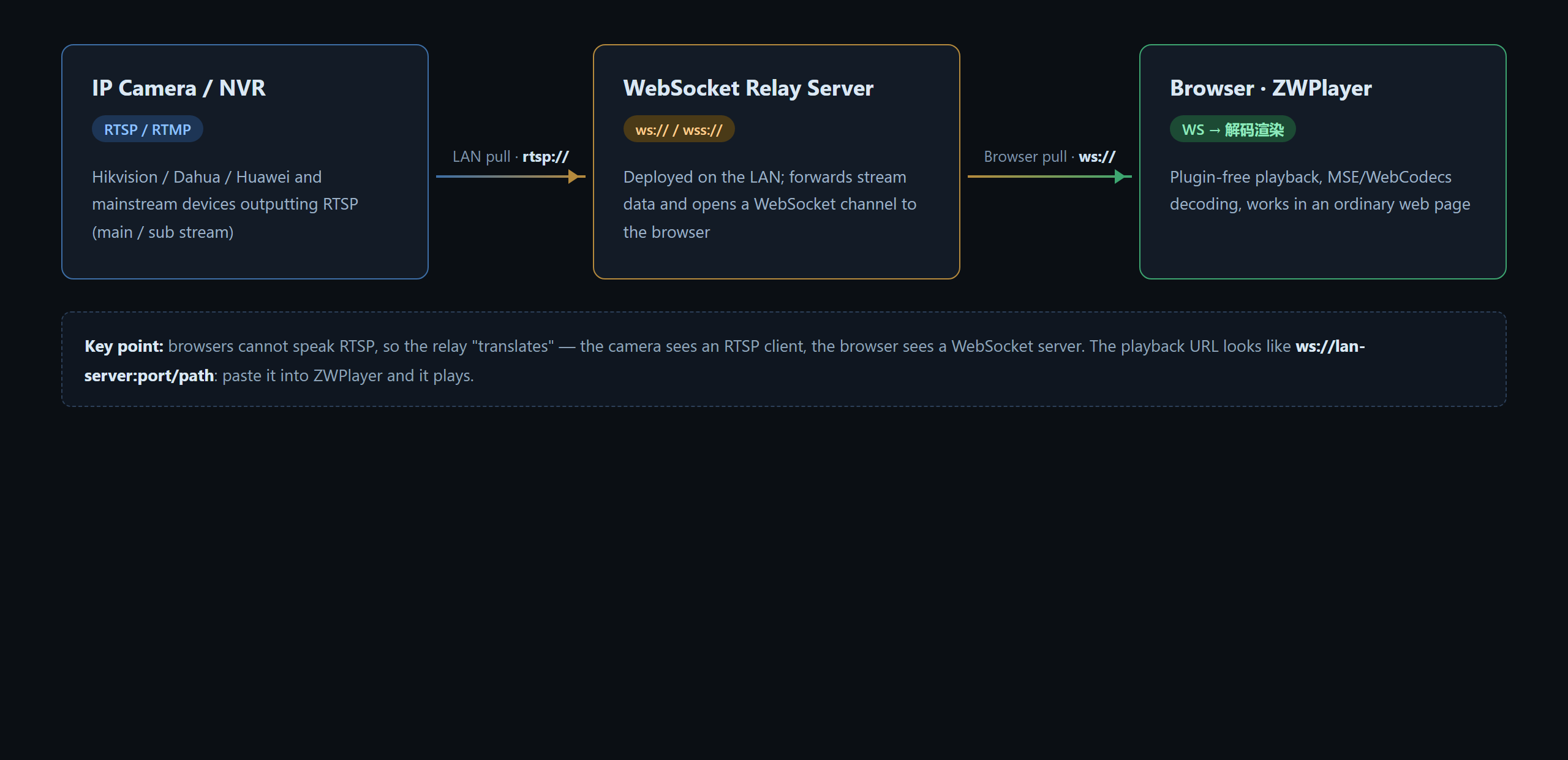 Figure 1: camera ←RTSP→ media gateway ←WebSocket→ browser player
Three Lines of Config
new ZWPlayer({
  playerElm: 'player',
  url: 'rtsp://admin:password@192.168.1.64:554/main',  // camera RTSP address
  xmc_url: 'ws://xmc.zwplayer.cn:8138',                // media gateway
  rtsp_over_tcp: true,                                  // TCP transport (default)
  rtsp_bypass: true,                                    // zero transcode (source codec browser-supported)
});
The four knobs:
| Option | Default | Notes |
|---|---|---|
url |
— | RTSP address (with credentials); main stream = quality, sub stream = smoothness |
xmc_url |
— | Gateway address (ws:// or http://); pulls the stream and translates protocols |
rtsp_over_tcp |
true |
RTSP transport: TCP is stable across networks; LAN-only may try false (UDP, lower latency) |
rtsp_bypass |
false |
true = no re-encode (lowest latency; requires browser support for the source codec, e.g. H.264); false = forced transcode (best compatibility) |
Where do addresses come from? Hikvision/Dahua/Huawei devices follow fixed RTSP patterns (rtsp://user:pass@IP:554/channel-path) — see our RTSP URL format cheat sheet, plus main stream vs sub stream. Web viewing usually picks the sub stream: enough resolution, bitrate tier lower.
Three Field Scenarios
- Factory / retail video walls: a dozen cameras in a grid, ZWPlayer instance each with its rtsp:// URL, all managed by the gateway; sub stream +
rtsp_bypass: truekeeps the wall smooth; - Remote equipment inspection: cameras live on a customer’s LAN — put the gateway inside that LAN, let the web page reach the gateway over the public network, and cameras never need public IPs;
- Fisheye/panoramic cameras: their footage drops straight into VR mode for a natural view with full freedom to look around.
Troubleshooting
Black screen / eternal loading: open the same rtsp:// in VLC on the same machine first — if VLC fails too, it’s network or addressing (credentials, channel path, port 554), not the player.
Plays but stutters every few seconds: bitrate exceeding decode or bandwidth — switch to the sub stream address, or set rtsp_bypass: false to let the gateway transcode down.
Nothing across networks / over the internet: rtsp_over_tcp must be true (UDP cannot route across subnets).
H.265 cameras: Safari and hardware-decoding Edge/Chrome can bypass H.265; otherwise rtsp_bypass: false transcodes to H.264 at the gateway.
It Composes With Everything Else
Gateway output enters ZWPlayer’s full capability stack: multi-bitrate switching, subtitle preload (when the gateway emits HLS), anti-record watermarks, progress thumbnails for recordings. Camera feeds and on-demand content share player experience.