
ZWPlayer Chapter Usage Guide
1. Feature Overview
ZWPlayer supports adding chapters to video files, which is particularly suitable for scenarios like educational videos that require navigation based on knowledge points. Through preset chapter markers, users can quickly jump to specific knowledge points for learning.
The interface is shown in the figure below:
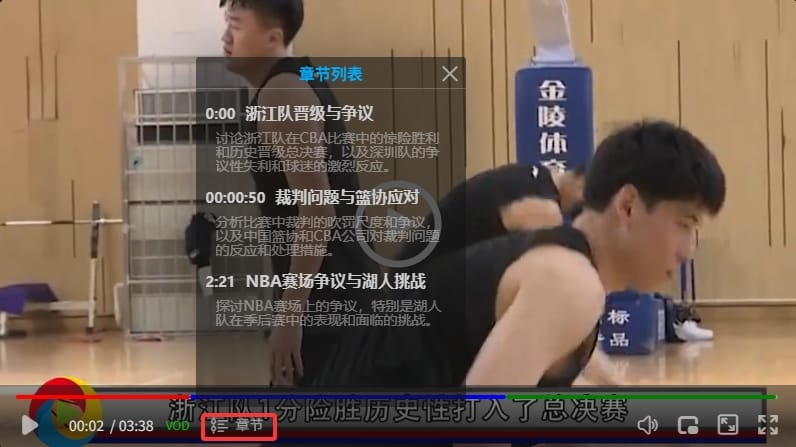
After successfully setting chapter information:
-
Progress Bar Markers: Chapter flags will appear on the player’s progress bar.
-
Chapter Menu: A chapter menu button will appear near the control bar time display area. Click the
Chapterbutton to pop up theChapter List; clicking a specific chapter jumps to that position to start playback. ThechapterButtonparameter only controls whether this button is displayed; it does not affect chapter data loading or progress bar markers. -
Chapter Search: Click the “Chapter Search” button in the player settings menu to open the chapter search panel. Enter keywords to instantly filter chapters by title or description, and click a search result to jump to the corresponding time point.
-
Chapter Loop: In the chapter search panel, each chapter entry has a loop button on the right. Click it to loop playback within that chapter’s time range.
2. Configuration Parameters
2.1 chapters - Chapter Data (Property)
-
Type: String | Array | Object
-
Default Value: None
-
Description: Pass chapter data through the constructor during player initialization. Supports the following input methods:
- URL String: A remote chapter file URL starting with
httporhttps; the player automatically downloads and parses it. - ZWMAP JSON Object: A protocol object containing
zwp_type: "chapter". - Chapter Array: An already parsed chapter entries array.
- URL String: A remote chapter file URL starting with
new ZWPlayer({
    playerElm: 'mse',
    url: 'https://cdn.example.com/video.mp4',
    chapters: 'https://cdn.example.com/chapters/movie_chapter.json'
});
You can also use the setChapters method for delayed loading after initialization (see Section 3).
2.2 chapterButton - Chapter Menu Button
-
Type: Boolean
-
Default: none (automatically enabled when chapters are loaded)
-
Description: Controls whether the chapter menu button appears near the control bar time display area.
- When set to
false: Progress bar chapter markers are still displayed normally; only the menu button is hidden. Chapter data loading is not affected by this parameter. - When set to
trueor omitted: The menu button is automatically displayed when chapter data is loaded.
- When set to
new ZWPlayer({
    playerElm: 'mse',
    url: 'https://cdn.example.com/video.mp4',
    chapterButton: false, // Hide menu button, but progress bar markers still display
    chapters: 'https://cdn.example.com/chapters/movie_chapter.json'
});
3. Setting Chapter Information (Method)
Use the setChapters method to load chapter information. It is recommended to call this method after the video file has finished loading.
3.1 Method Signature
player.setChapters(chapters);3.2 Parameter Types
The chapters parameter supports the following three formats:
- A large string containing chapter content (JSON or VTT format)
- A parsed js array
- An HTTP address for the chapter file
The chapters parameter can be a string or an already parsed js array. zwplayer will automatically identify and load chapter information based on the parameter content.
4. Chapter Data Formats
4.1 ZWMAP JSON Format (Recommended)
ZWMAP (ZWPlayer Media Application Protocol) is a standard JSON format defined by zwplayer. The exported file is named {VideoTitle}_chapter.json. The format is as follows:
{
  "zwp_protocol": "ZWMAP/1.0",
  "zwp_type": "chapter",
  "zwp_version": "1.0",
  "chapters": [
    {
      "title": "Triangle Knowledge Points",
      "start_time": "00:01:04.000",
      "desc": "Introduction to triangle properties, congruence, and additional knowledge",
      "style": { "background": "blue" }
    },
    {
      "title": "Quadrilateral Knowledge",
      "start_time": "00:02:04.000",
      "desc": "Introduction to quadrilateral properties, congruence, and additional knowledge",
      "style": { "background": "green" }
    }
  ]
}
ZWMAP Protocol Additional Fields:
| Field | Type | Description |
|---|---|---|
| zwp_protocol | string | Protocol identifier, fixed as "ZWMAP/1.0" |
| zwp_type | string | Data type, fixed as "chapter" |
| zwp_version | string | Protocol version number |
| chapters | array | Chapter array |
Properties of each object in the chapter array:
| Property Name | Format | Description |
|---|---|---|
| title | string | Chapter title |
| start_time | string or number | Chapter start time, in HH:MM:SS.mmm format or a floating point number (seconds) |
| end_time | string or number | Chapter end time (optional); if left blank, defaults to the start time of the next chapter |
| desc | string | Chapter introduction (optional) |
| style | JSON object | Chapter style (optional), e.g., {"background": "blue"}, defaults to red if omitted |
| image | string | Chapter start point image URL (optional) |
4.2 Legacy JSON Format (Compatible)
Chapter files can also use the legacy bare array format defined by zwplayer:
[
  {
    "title": "Triangle Knowledge Points",
    "desc": "Introduction to triangle properties, congruence, and additional knowledge",
    "time": "01:04",
    "duration": 60,
    "style": {
      "background": "blue"
    },
    "image": null
  },
  {
    "title": "Quadrilateral Knowledge",
    "desc": "Introduction to quadrilateral properties, congruence, and additional knowledge",
    "time": "02:04",
    "duration": 50,
    "style": {
      "background": "green"
    },
    "image": null
  }
]
Field correspondence between the legacy format and ZWMAP format:
| Legacy Field | ZWMAP Field | Description |
|---|---|---|
time |
start_time |
Chapter start time |
duration |
end_time |
Duration / End time |
desc |
desc |
Same |
style |
style |
Same |
image |
image |
Same |
4.3 VTT Format (WEBVTT)
If the chapter data starts with WEBVTT, zwplayer will automatically parse it as VTT format.
See the VTT format specification for details
5. Automatic Recognition Rules
zwplayer automatically identifies the chapter format based on the parameter content:
- Starts with HTTP/HTTPS: Treated as a remote chapter file URL and downloaded automatically.
- Object and contains
zwp_type: "chapter": Parsed as ZWMAP protocol format, extracting thechaptersarray. - Starts with “[”: Parsed as a JSON array.
- Starts with “WEBVTT”: Treated as a WEBVTT file.
6. Usage Examples
Example 1: Loading Chapters via URL
// Initialize player
window.mainplayer = new ZWPlayer({
    url: 'http://example.com/vod/movie.mp4',
    playerElm: '#mse',
    chapterButton: true, // Enable chapter button
});

// Load chapter information with a delay
setTimeout(function () {
    if (window.mainplayer) {
        window.mainplayer.setChapters('http://example.com/chapters/movie_chapter.json');
    }
}, 200);
Example 2: Configuration via chapters Property
window.mainplayer = new ZWPlayer({
    url: 'http://example.com/vod/movie.mp4',
    playerElm: '#mse',
    chapterButton: true,
    chapters: 'http://example.com/chapters/movie_chapter.json'
});
Example 3: Loading via Ajax and Passing an Array
// Initialize player
window.mainplayer = new ZWPlayer({
    url: 'http://example.com/vod/movie.mp4',
    playerElm: '#mse',
    chapterButton: true,
});

// Use jquery Ajax to load chapter information
$.get('http://example.com/chapters/movie_chapter.json', {}, function (data) {
    if (window.mainplayer) {
        window.mainplayer.setChapters(data);
    }
}, 'json');
Example 4: Passing a Chapter Array Directly
const chapters = [
    {
        title: "Chapter 1",
        desc: "Knowledge point introduction",
        time: "00:00:10"
    },
    {
        title: "Chapter 2",
        desc: "Advanced content",
        time: "00:05:30"
    }
];

player.setChapters(chapters);
Example 5: Drag and Drop File Loading
Drag and drop the chapter JSON file directly onto the player to load chapters. The following drag-and-drop methods are supported:
- Drag chapter JSON only: Drag the
_chapter.jsonfile into the player to load chapters for the currently playing video. - Drag video and chapters simultaneously: Drag the video file and the corresponding chapter JSON together; the player will automatically match and load them (e.g.,
movie.mp4matchesmovie_chapter.json). - Playlist drag-and-drop: Drag multiple videos and their corresponding chapter files; the player will automatically match them by filename and create a playlist with chapters.
The dragged JSON file supports both ZWMAP protocol format and the legacy bare array format; the player will identify them automatically.
7. Chapter Search
After chapters are loaded, click the “Chapter Search” button in the player settings menu to open the chapter search panel:
- Keyword Search: Enter keywords to instantly filter chapters by title or description, with matching text highlighted
- Jump to Position: Click a search result to jump to the corresponding chapter time point and start playback
- Draggable Panel: The search panel supports drag-and-drop repositioning to avoid blocking the video
- Close: Click the close button or press
Escto close the panel
8. Chapter Loop Playback
In the chapter search panel, each chapter entry has a loop button on the right side:
- Enable Loop: Click the loop button to loop playback within that chapter’s time range
- Auto-rewind: When playback reaches the chapter end time, it automatically jumps back to the chapter start time
- Cancel Loop: Drag the progress bar or click another chapter’s loop button to cancel the current loop
9. Notes
- Timing: It is recommended to set chapter information after the video has finished loading.
- Format Validation: Ensure the chapter data format is correct, especially the time format.
- Image Support: The current version does not yet support the chapter start point image feature.
- Compatibility: Supports both
hh:mm:ssformat and floating point number time representation. - Chapter Editor: Use the Online Chapter Editor to visually create and edit chapter data.
By using the chapter feature effectively, you can significantly enhance the user’s learning experience, especially for tutorial videos with clear content structure.