
ZWPlayer Source Input Address Parameter url Configuration Details
zwplayer is a powerful player that supports multiple protocol adaptation and multi-bitrate adaptation. To support these features, using a traditional string URL as the media source input is no longer sufficient. The name url is retained as the input address variable mainly for the sake of convention; it should be understood as the “source input address”. The following sections explain the input formats for the url parameter in different scenarios to help you fully utilize the features of zwplayer.
1. Simple Media Address Configuration
1.1 Basic Format
Supports standard URL string formats. The player automatically identifies the media protocol type based on the file extension.
1.2 Supported Protocol Examples
http://example.com/move1.mp4
http://example.com:8080/move1.flv
http://example.com:8080/live/stream.flv
http://example.com:8080/live/stream.m3u8
http://example.com:8080/live/stream.mpd
http://example.com:8080/live/stream.rtc
http://example.com:8080/live/stream.ts
http://example.com:8080/live/stream.mp3
In the URLs above, since they contain extensions, zwplayer automatically identifies the media protocol type based on the extension and calls the corresponding decoder for playback. No separate configuration is required for each protocol.
1.3 Handling Addresses Without Extensions
When the URL returned by the server does not contain a file extension, you must add a mime_type parameter to explicitly specify the media type:
http://www.example.com/c08ac56ae1145566f2ce54cbbea35fa3?mime_type=video_mp4Note: This mime_type parameter value is not consistent with the MIME type in the HTTP protocol. Adding the mime_type parameter to media streams without extensions is a practice used by some mainstream video websites.
1.4 Extension and Media Type Mapping Table
The simple URL syntax supported by zwplayer is consistent with mainstream standards. The mapping between URL extensions and media types is as follows:
| Extension | Media Type | mime_type Value | Stream Type |
|---|---|---|---|
| mp4 | mp4 media file | video_mp4 | Live, VOD |
| flv | flv file or http-flv live stream | video_flv | Live, VOD |
| m3u8 | Apple http live stream hls | video_hls | Live, VOD |
| mpd | Mpeg dash stream | video_dash | Live, VOD |
| rtc | webrtc live stream | video_rtc | Live |
| mp3,m4a,aac,mp4a,ogg | audio file stream | Live, VOD | |
| ts | mpeg2 ts stream | Live |
1.5 Protocol Header Determination
| Extension | Media Type | mime_type Value | Stream Type |
|---|---|---|---|
| rtc:// | webrtc live stream | video_rtc | Live |
| webrtc:// | webrtc live stream | video_rtc | Live |
| brtc:// | webrtc live stream | video_rtc | Live |
| rtsp:// | rtsp live stream, usually for monitoring cameras | Live |
1.6 Precautions
- If the
stream_typeparameter is specified, the value ofstream_typetakes precedence. - If the type cannot be determined via the
stream_typeparameter, protocol header, or extension, it is handled as video_mp4.
2. Multi-Bitrate Program Configuration
2.1 Application Scenarios
Currently, the vast majority of video websites provide bitrates of different qualities for users to choose from during video playback. For example, when opening a video program, the player might offer streams in 1080P, 720P, 480P, 360P, etc. Higher definition streams usually consume more network bandwidth, while lower definition streams are generally smoother. In reality, these different quality streams are provided by different media files. For live programs, implementing multiple bitrates requires the server to encode and output multiple streams simultaneously. zwplayer provides robust support for multi-bitrate programs.
Note: Supporting multiple bitrates requires not only player-side support but also relevant support from the media server side.
The image below shows a zwplayer instance playing a multi-bitrate program:
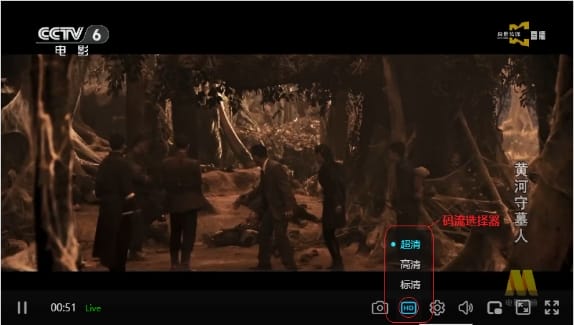
For multi-bitrate programs, zwplayer creates a stream selector and adds a button labeled “HD” in the control bar. Users can click this button to pop up the stream selection menu to choose the desired bitrate.
2.2 Configuration Format 1: Object Array
Using a simple string URL cannot represent complex address information. Therefore, to support a multi-bitrate program, you need to provide a JavaScript array as the url parameter for the media source, rather than a simple string. Each member of the array is a stream address information object. The following is an example of a JavaScript object for the multi-bitrate media source url parameter:
var live_murl = [
	{
		"name": "HD1",
		"url": "http://example.com/media/stream-hd.flv"
	},
	{
		"name": "SD1",
		"url": "http://example.com/media/stream-ld.flv",
		"default": true
	},
	{
		"name": "SD2",
		"url": "http://example.com/media/stream-sd.flv"
	}
];
As shown in the code above, each address information object is a JavaScript object containing properties such as name, url, and default.
- name: The identifier of the stream.
- url: The actual address of the stream.
- default: Boolean type, indicating whether this is the preferred stream. If it is the preferred stream, set it to true; otherwise, it can be omitted or set to false.
2.3 Configuration Format 2: Compatible with Third-Party Player Formats
Some third-party players use an array format for single addresses in multi-bitrate source inputs. zwplayer also supports this. For example:
var live_urls2 = [
		[
			"http://example.com/stream-uhd.flv",
			"FULL_HD1"
		],
		[
			"http://example.com/stream-hd.flv",
			"HD1"
		],
		[
			"http://example.com/stream-ld.flv",
			"SD1"
		],
		[
			"http://example.com/stream-sd.flv",
			"SD2"
		]
	];
The example above demonstrates the source input address format for some third-party players, where each stream address is an array:
- The 0th position is the url.
- The 1st position is the stream name (name), which can be omitted.
- The 2nd position is the mime type, usually omitted.
2.4 Recommendations for Stream Identifier Standardization
Some online video platforms use English identifiers for the name property of stream address objects. zwplayer will replace these with user-readable words in the current language when creating the stream selector. The mapping table is as follows:
| Identifier | Readable Word (Simplified Chinese) | Japanese | English |
|---|---|---|---|
| HD1 | 超清 | ||
| SD1 | 高清 | ||
| SD2 | 标清 | ||
| HD | 高清 | ||
| FHD | 全高清 | ||
| BD | 蓝光 | ||
| BD 4M | 蓝光4M | ||
| BD 8M | 蓝光8M | ||
| FULL_HD1 | 原画 |
It is recommended to use the abbreviations above for the stream name value when constructing the source input address, so that the player can translate them into user-readable words when supporting multiple languages.
Stream identifiers are fully customizable and do not have to follow the table above. For example, here is an example of a custom stream identifier:
var live_murl = [
	{
		"name": "1080P",
		"url": "http://example.com/media/stream-hd.flv"
	},
	{
		"name": "720P",
		"url": "http://example.com/media/stream-ld.flv",
		"default": true
	},
	{
		"name": "480P",
		"url": "http://example.com/media/stream-sd.flv"
	}
];
As shown in the example above, 1080P, 720P, and 480P are custom identifier names. Note that these custom identifier names will not be processed during multi-language translation. Therefore, try to avoid using identifiers specific to a certain language (e.g., “高清”, “电脑观看”, “手机观看” in Simplified Chinese will not be translated and will still display in Chinese in a Japanese environment).
2.5 Recommended Configuration Format
zwplayer recommends adopting the following format to construct the input address for multi-bitrate program sources. An example is as follows:
var live_url = {
		..more properties..
		murls: {
			"FULL_HD1": "http://example.com/stream-or4.flv",
			"HD1": "http://example.com/stream-hd.flv",
			"SD1": "http://example.com/stream-ld.flv ",
			"SD2": "http://example.com/stream-sd.flv"
		},
		multistream: 4  // Number of streams (optional)
};
When using the recommended format above, the url parameter is an object. Apart from the murls and multistream properties which are necessary for zwplayer, other properties can be extended arbitrarily.
- murls: A JavaScript object (not an array) type. Each stream address in this object is a property of the object, where the property name is the stream identifier and the property value is the actual URL address of the stream.
- multistream: Indicates the total number of streams in this source address. It can be omitted.
This format is relatively concise and intuitive to construct, so its use is recommended.
2.6 Multi-Bitrate for HLS/DASH Protocols
Certain protocols support embedded multiple bitrates within a single string URL. For example, HLS and DASH protocols inherently support multiple bitrates. zwplayer perfectly supports URLs for HLS and DASH streams containing embedded multiple bitrates, supporting both adaptive switching and manual switching of embedded bitrates in HLS and DASH.
For more technical details regarding HLS and DASH embedded multiple bitrates, please refer to the relevant documentation.
3. Multi-Protocol Adaptive Address Configuration
The same media source supports multiple transmission protocols, and the player automatically selects the optimal protocol for playback.
3.1 Application Scenarios
With the development of streaming media technology, streaming media providers support multiple protocol outputs to accommodate playback on different terminals. For example, for live streaming, some streaming media servers output supports HTTP, HTTP-FLV, WebSocket, HLS, and DASH simultaneously. For VOD program streams, the same program might support MP4, FLV, HLS, and DASH outputs simultaneously. As for how to play, the streaming media server provider is not responsible; the playback terminal must solve it itself. zwplayer provides comprehensive support for this. You can pass stream addresses of different protocols to the zwplayer simultaneously, and zwplayer will determine which protocol to use itself. This is so-called multi-protocol adaptive playback.
To support multi-protocol playback addresses, you need to pass a JavaScript object as the url parameter to zwplayer. Each property name of the JS object represents the transmission protocol, and the property value represents the URL address for that protocol.
3.2 Multi-Protocol Configuration for Live Streams
For live stream addresses, an example of a multi-protocol playback address format is as follows:
{
  "httpflv": "http://example.com:8188/live/stream0020.flv",
  "rtc": "http://example.com:8188/live/stream0020.rtc",
  "wsflv": "ws://example.com:8188/live/stream0020.flv",
  "httpflv-n": "http://example.com:8189/live/stream0020.flv",
  "wsflv-n": "ws://example.com:8189/live/stream0020.flv",
  "httpflv-n6": "http://[2408:8207:1858::332f:e4e8]:8189/live/stream0020.flv",
  "wsflv-n6": "ws://[2408:8207:1858::332f:e4e8]:8189/live/stream0020.flv",
  "hls": "http://example.com:8188/live/hls/stream0020/index.m3u8",
  "dash": "http://example.com:8188/live/dash/stream0020/index.mpd",
  "rtmp": "rtmp://example.com:1945/stream0020"
}
The multi-protocol address object properties supported by zwplayer for live and VOD programs are as follows:
| Property Name (Protocol) | Protocol Description |
|---|---|
| httpflv | FLV stream output via HTTP or HTTPS protocol |
| rtc | Live stream output via WebRTC protocol |
| wsflv | FLV stream output via WebSocket (ws) or WebSocket SSL (wss) |
| httpflv-n | FLV stream output via HTTP/HTTPS (useful for multi-port servers) |
| wsflv-n | FLV stream output via WS/WSS (useful for multi-port servers) |
| httpflv-n6 | FLV stream output via IPv6-based HTTP/HTTPS |
| wsflv-n6 | FLV stream output via IPv6-based WS/WSS |
| hls | Live stream output via Apple HTTP Live Streaming protocol |
| dash | Live stream output via MPEG DASH protocol |
| rtmp | Adobe RTMP protocol. Note: The HTML5-based zwplayer does not support RTMP playback |
| http | Any file format address output via HTTP protocol |
For multi-protocol live addresses, one or more of the above properties are sufficient; it is not necessary to support every protocol listed. For example, the following input format is a common one:
{
    "httpflv": "http://example.com:8188/live/stream0020.flv",
    "hls": "http://example.com:8188/live/hls/stream0020/index.m3u8"
}
Most video websites’ live protocols only support HTTP-FLV and HLS, so providing just these two properties is sufficient.
3.3 Multi-Protocol Configuration for VOD Streams
For VOD (recorded playback) streams, the multi-protocol playback address URL can use the following format:
{
"type": "dvr",
"httpflv": "http://example.com:1936/vod/stream0020.flv",
"http": "http://example.com:8088/vod/mp4/movie001.mp4",
"hls": "http://example.com:8088/vod/hls/movie001/index.m3u8",
"dash": "http://example.com:8088/vod/dash/movie001/manifest.mpd"
}
In the example above, httpflv, http, hls, and dash are protocol names. Providing at least one protocol is sufficient.
4. Playlist URL Configuration
4.1 Use Case
When the url parameter points to a ZWMAP playlist JSON file (zwp_type: "playlist"), the player automatically detects it and enters playlist mode without any additional configuration. The JSON file can be visually generated and exported using the Online Playlist Editor.
4.2 Basic Usage
Pass the playlist JSON file URL directly as the url parameter:
new ZWPlayer({
    playerElm: 'mse',
    url: 'https://example.com/playlist/my_playlist.json'
});
The player detects the zwp_protocol: "ZWMAP/1.0" and zwp_type: "playlist" headers in the JSON and automatically loads it in playlist mode.
4.3 Playlist JSON Format
The playlist file uses the ZWMAP protocol format, supporting single-level or multi-level group structures:
{
    "zwp_protocol": "ZWMAP/1.0",
    "zwp_type": "playlist",
    "title": "Course Series",
    "groups": [
        {
            "title": "Chapter 1",
            "items": [
                {
                    "title": "1.1 Introduction",
                    "url": "https://cdn.example.com/video/intro.mp4",
                    "chapter": "https://cdn.example.com/chapter/intro_chapter.json"
                },
                {
                    "title": "1.2 Basics",
                    "url": "https://cdn.example.com/video/basics.mp4",
                    "subtitle": ["https://cdn.example.com/sub/basics.vtt"]
                }
            ]
        }
    ]
}
4.4 Associated Resources per Video Item
| Property | Type | Description |
|---|---|---|
url |
string | Video/audio source URL (supports all URL formats described above) |
title |
string | Video title |
chapter |
string/array | Chapter JSON URL, auto-loaded during playback |
subtitle |
string/array | Subtitle file URL (VTT/SRT/BCC), auto-loaded during playback |
annotation |
string/object | Annotation JSON URL, auto-loaded during playback |
4.5 Notes
- The playlist JSON must include the ZWMAP protocol headers (
zwp_protocolandzwp_type) - Video URLs in items support all formats described in this document (simple URL, multi-bitrate, multi-protocol)
- Associated resources (subtitles, chapters, annotations) for each video item are automatically loaded when that item starts playing
- For the full playlist specification, see ZWMAP Playlist Specification; for feature details, see Playlist Usage Guide