
Danmaku Settings.md
1. Overview
Danmaku (bullet comments) is a core interactive feature of modern video websites, enabling real-time interaction between viewers by overlaying scrolling text on the video screen. The zwplayer provides a complete solution for danmaku support.
2. Technical Architecture Design
The operational principle of zwplayer’s danmaku support is as follows: a playback terminal sends a string of danmaku to a danmaku server, which then forwards it to various receiving terminals. Upon receiving the danmaku, the receiving terminals call the relevant methods provided by the zwplayer to append the danmaku to an internal list, after which the rendering process is completed.
zwplayer’s support for danmaku implements the danmaku rendering and the sending settings UI, but it does not implement the actual sending of the danmaku. The sending of danmaku is implemented by the developer using appropriate transmission technologies (e.g., calling WebSocket or various cloud service vendors’ IM interfaces). This design avoids binding zwplayer to a specific forwarding server, allowing users the freedom to choose their own technical architecture for danmaku transmission.
To help developers quickly set up danmaku functionality, we have also implemented a danmaku server module. For details, please refer to Danmaku Server Documentation.
3. Core Implementation Steps
3.1 Danmaku Sending Functionality
Provide a custom function to handle danmaku sending:
sendDanmu: function(text) {
    // Implement danmaku sending logic
    if (typeof window.ws_send === 'function') {
        window.ws_send(text);
    }
}
3.2 Danmaku Receiving and Display
Upon receiving danmaku from the server, call the player API to display it:
// After receiving danmaku data
window.mainplayer.appendDanmu(danmuObj);
4. Complete Example (WebSocket Implementation)
<body>
<div id="player-holder"></div>
<div id="dammu-controlbar"></div>
</body>
<script language=”javascript”>
    window.mainplayer = new ZWPlayer({ // Save the object to mainplayer for appending danmaku
    url:'http://example.com/vod/test.mp4',
    playerElm:'#player-holder', // Player element ID, can also be a direct DOM object
    controlbar: true,
    enableDanmu: true,
    sendDanmu: function(text) { // Provide a custom function to send the danmaku entered in the internal UI
        if (typeof window.ws_send === 'function') {
            window.ws_send(text);
        }
        }
    });
    // Create the zwplayer internal danmaku input UI inside the DIV element with the ID dammu-controlbar
    window.mainplayer.buildDanmuControlbar('dammu-controlbar');
    // Create a websocket for sending and receiving danmaku
    var wsChat = new WebSocket('ws://192.168.1.64:3680');

    wsChat.onopen = function() {
        console.log('ws client opened')
    }
    wsChat.onmessage = function(event) {
    if (event.data.length > 0) {
        var danmuObj = JSON.parse(event.data);
        if (window.mainplayer) {
            // Received danmaku forwarded by the server, append the danmaku to the zwplayer danmaku list
            window.mainplayer.appendDanmu(danmuObj);
        }
    }
    }

    // Send function implemented via websocket for sending danmaku to the server
    window.ws_send = function wsChatSend(data) {
        wsChat.send(data);
    }
</script>
The code above implements an example of sending and receiving danmaku via WebSocket. First, when creating the zwplayer instance, the sendDanmu parameter is provided, pointing to a user-defined function. Inside this custom function, the WebSocket object is called to send danmaku data. Next, when creating the WebSocket object, the onmessage event is used to listen for danmaku messages forwarded by the server. This message is essentially an encoded JSON string; after JSON decoding, the appendDanmu method of zwplayer is called to append the danmaku to the player’s internal list for rendering.
5. Built-in Danmaku Control UI
zwplayer provides a fully functional danmaku input interface, including:
- Danmaku text input
- Emoji selection
- Danmaku settings
- Danmaku toggle control
The purpose of zwplayer’s built-in danmaku input UI is to input danmaku, emojis, configure settings, and toggle danmaku. Although developers can implement this UI themselves, considering that building a danmaku input UI from scratch is not trivial, zwplayer exposes the buildDanmuControlbar function to create the danmaku input UI. Reusing this UI can save time spent “reinventing the wheel,” so its use is recommended.
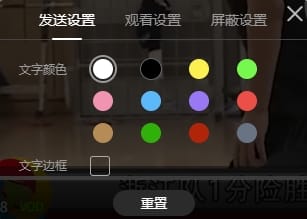
This danmaku control UI can be bound to a DIV element separate from the player. During fullscreen playback, it will automatically dock below the player for convenient user input.
The danmaku UI interface is shown below:

Click the settings icon shown in the red box to pop up the following settings panel
6. appendDanmu Method
Function Prototype: function appendDanmu(danmuObj, setting)
6.1 danmuObj Parameter (Danmaku Object)
| Attribute Name | Type | Description |
|---|---|---|
| text | string | Required, Danmaku text content |
| color | string | Optional, Font color setting |
| border | string | Optional, Text border style, similar to CSS (e.g., “1px solid #666”) |
| outlineColor | string | Optional, Outer border color; if not set, there is no border |
6.2 setting Parameter (Danmaku Settings)
The setting parameter is for the current individual danmaku comment. While the danmuObj parameter allows for simple style settings, this parameter allows for more detailed configuration for a single danmaku. This parameter can be omitted; if omitted, the player’s internal current danmaku settings will be used. The setting parameter is a JavaScript object, and its relevant attributes are described as follows:
| Attribute Name | Type | Description |
|---|---|---|
| forcedFontSizeValue | number | Force font size. 100 is the base font size (default). Greater than 100 enlarges the font; otherwise, it shrinks. |
| isFilterColorFont | boolean | Whether to filter colored fonts. If true, the color from danmuObj is ignored. |
| opacityValue | number | Opacity (0-100). 100 is fully visible, 0 is fully transparent/invisible. |
| speedValue | number | Scrolling speed of the danmaku text, as a multiple of 100 pixels. If 1, it scrolls 100 pixels per second; if 0.5, it scrolls 50 pixels per second. |
| isFilterImage | boolean | Whether to filter emoji images in the danmaku. If true, emoji images within the danmaku will not be displayed. |