
ZWPlayer Logo Setup Guide
ZWPlayer supports overlaying a custom brand logo on the video screen via the logo parameter, suitable for simple branding scenarios.
For more powerful watermark features (image watermarks, text watermarks, dynamic anti-screen-recording watermarks, tile watermarks, template variables, etc.), see Watermark Setup.
1. Simple Configuration (String Format)
Directly set the logo parameter to the URL address of the Logo image:
logo: 'http://example.com/vod/logo.png'Default Display Effect:
- Position: Top-right corner of the player (top margin 5%, right margin 5%)
- Size: 5% of the player width
- Opacity: 50% (semi-transparent effect)
2. Advanced Configuration (Object Format)
Perform detailed configuration via a JavaScript object:
logo: {
    icon: 'http://example.com/vod/logo.png',
    dock: 'left',
    x: '5%',
    y: '5%',
    width: '20%',
    height: '20%',
    opacity: 70
}
3. Logo Object Properties
| Property | Type | Default | Required | Description |
|---|---|---|---|---|
icon |
string | Yes | Logo image URL, supports PNG, JPG, GIF, SVG formats. PNG or SVG images with transparency are recommended. | |
dock |
string | right | No | Logo docking area, optional values: left (left side), right (right side). |
x, y |
string | 5% | No | Logo position coordinates, relative to the player. Supports pixel values (e.g., 60px) or percentages (e.g., 5%). |
width, height |
string | 5% | No | Logo dimensions, supports pixel values or percentages (relative to player size). |
opacity |
number | 50 | No | Opacity, value range 0-100 (0: fully transparent, 100: fully opaque). Recommended value: 30-70. |
4. Complete Example
<script language="javascript">
   window.mainplayer = new ZWPlayer({
      url: 'http://example.com/vod/movie.mp4',
      playerElm: '#player-holder',
      controlbar: true,
      logo: {
         icon: 'http://example.com/vod/cctv-3-logo.png',
         dock: 'right',
         opacity: 70,
         x: '5%',
         y: '2%',
         width: '15%',
         height: '15%',
      }
   });
</script>
5. Effect Showcase
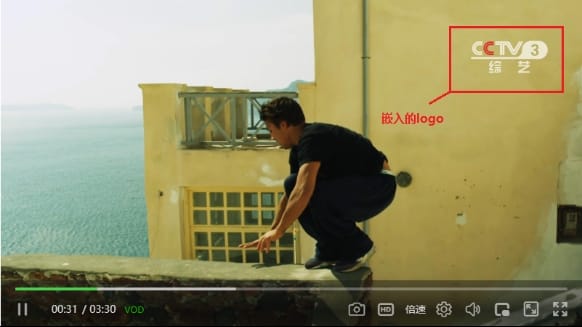
Illustration: Logo effect displayed in the top-right corner of the player
6. Advanced: Watermark Setup
The logo parameter is suitable for simple branding scenarios. If you need the following features, use the watermarks parameter instead:
- Text Watermarks: Display custom text
- Dynamic Roaming Watermarks: Anti-screen-recording protection
- Tile Watermarks: Tilted text grid covering the entire screen
- Template Variables: Dynamic content like
{user_id},{sys_time}, etc. - Multi-watermark Overlay: Display multiple watermarks simultaneously
See Watermark Setup Guide for details.